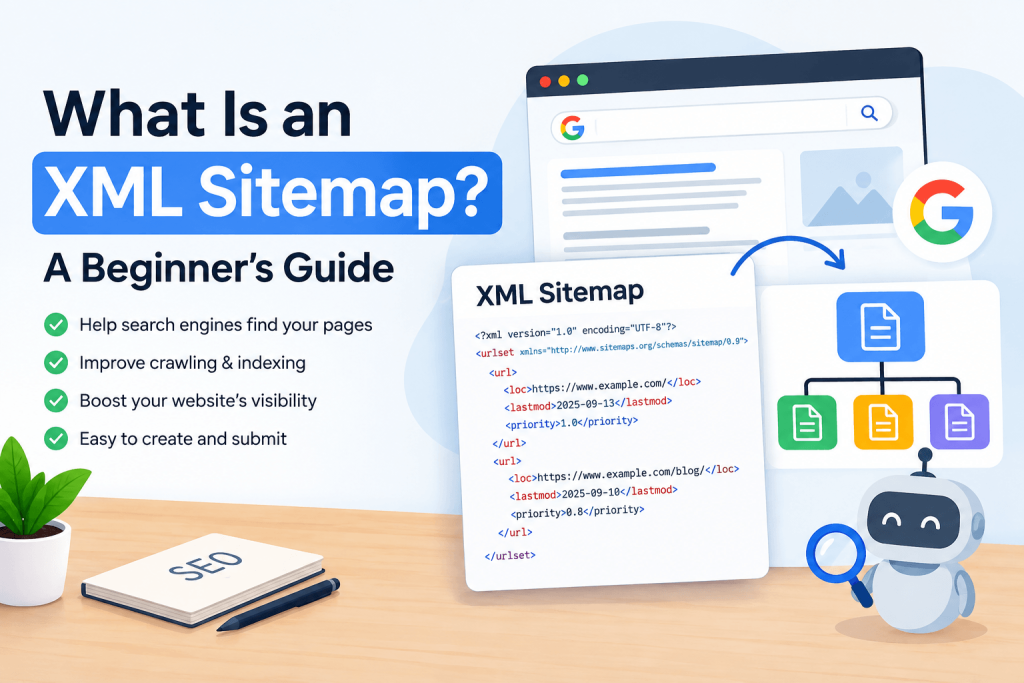
What Is an XML Sitemap? A Beginner’s Guide
If you’ve spent any time trying to get your website noticed on Google, you’ve probably run into the term “XML sitemap” at some point. Maybe a plugin asked you to generate one, or an SEO checklist told you to submit one to Google Search Console, and you just clicked through without really knowing what it was doing. That’s completely normal. Most website owners use sitemaps for years without fully understanding them, and honestly, you don’t need a computer science degree to get it. Let’s break it down in plain language, step by step. 1. What Is an XML Sitemap? Think of your website as a big house with lots of rooms. Some rooms are easy to find because they’re right off the main hallway. Others are tucked away behind three or four doors, and a visitor might never stumble onto them by accident. An XML sitemap is basically a floor plan of that house that you hand to a guest (in this case, a search engine) so it can walk straight to every single room without getting lost or missing anything. In technical terms, an XML sitemap is a file, usually named something like sitemap.xml, that lists out all the important pages on your website. It’s written in a format called XML (Extensible Markup Language), which is just a structured way of organizing information so that computers can read it easily. Humans can technically read it too, but it looks more like code than a normal webpage, with lots of tags and brackets. Here’s roughly what a tiny piece of one looks like: <url> <loc>https://example.com/about-us</loc> <lastmod>2026-08-14</lastmod> </url> That little snippet is telling a search engine “hey, there’s a page at this exact address, and it was last updated on this date.” Multiply that by every page on your site, and you’ve got a full sitemap. 2. How Does an XML Sitemap Work? Search engines rely on programs called “crawlers” or “spiders” to explore the web. Normally, a crawler lands on your homepage, follows the links it finds there, then follows the links on those pages, and keeps going like that, page after page. This is how most content gets discovered without anyone submitting anything. An XML sitemap changes that process a little. Instead of making the crawler wander around hoping to bump into every page, you hand it a direct list. The crawler reads through the file, sees every web address you’ve included, and can visit each one directly. It’s less like exploring a maze and more like being handed a checklist. This doesn’t force a search engine to index everything on the list. Sitemaps are treated as a strong hint, not a command. But they remove the guesswork of discovery, which is often the biggest hurdle for pages that would otherwise be hard to stumble onto. 3. Why Is an XML Sitemap Important for SEO? You might be wondering why this matters if crawlers can already follow links on their own. The truth is, real websites get messy. Maybe you have pages that aren’t linked from anywhere obvious. Maybe your site is brand new and doesn’t have many other websites linking to it yet, so crawlers rarely wander over. Maybe you run a large online store with thousands of product pages, and some of them sit three or four clicks deep from the homepage. In all of these cases, a crawler could easily miss pages, or take a long time to find them. A sitemap fixes this by giving search engines a shortcut. It’s especially useful for: It’s not a magic ranking boost on its own, but it does make sure your content gets a fair chance to be seen and considered in the first place, which is the first step before any ranking can happen at all. 4. What Information Does an XML Sitemap Contain? A basic sitemap just needs the web address of each page. But most sitemaps include a few extra details that help search engines prioritize: It’s worth knowing that Google has said it mostly ignores the priority and change frequency fields these days, leaning more on its own judgment. So don’t stress too much over getting those numbers perfect. The web address and last modified date are the parts that actually carry weight. 5. Types of XML Sitemaps Not every sitemap covers the same kind of content. Depending on what your site offers, you might end up with more than one type: Large websites sometimes also use a “sitemap index,” which is basically a sitemap of sitemaps. If you have 50,000 product pages, you can’t fit them all into one file (there are size and entry limits), so you split them into several smaller sitemap files and list all of them in one index file. 6. XML Sitemap vs HTML Sitemap These two often get confused, but they serve completely different audiences. An XML sitemap is built for search engines and crawlers to read, not for people, since it’s mostly code with tags and web addresses. An HTML sitemap, on the other hand, is a regular webpage listing your site’s main sections, designed for actual human visitors to browse and navigate more easily. Some websites use both. The XML version helps search engines, and the HTML version acts like a table of contents for visitors, which can also help with navigation on larger sites. If you only have time for one, the XML sitemap is the more important one for SEO purposes. 7. What URLs Should Be Included? Generally, your sitemap should only include pages you actually want people to find through search engines. This usually means: The rule of thumb is simple: if a page is useful, unique, and something you’d want a stranger to land on from a search, it belongs in your sitemap. 8. What URLs Should NOT Be Included? Just as important as knowing what to include is knowing what to leave out. Including the wrong pages doesn’t just clutter your sitemap, it can actually confuse search engines about