
If you have ever written a great blog post and still watched it sit at the bottom of Google, the problem might not be your content at all. It could be your website’s technical health. This is where technical SEO comes in.
Most beginners focus only on keywords and backlinks. But Google also looks at how your site works behind the scenes — how fast it loads, whether it’s mobile-friendly, and whether search engines can even crawl your pages properly.
In this guide, you will learn what technical SEO really means, why it matters, and how you can start fixing the small issues that quietly hurt your rankings. No jargon, no confusing terms — just simple explanations you can actually use today.
What Is Technical SEO?
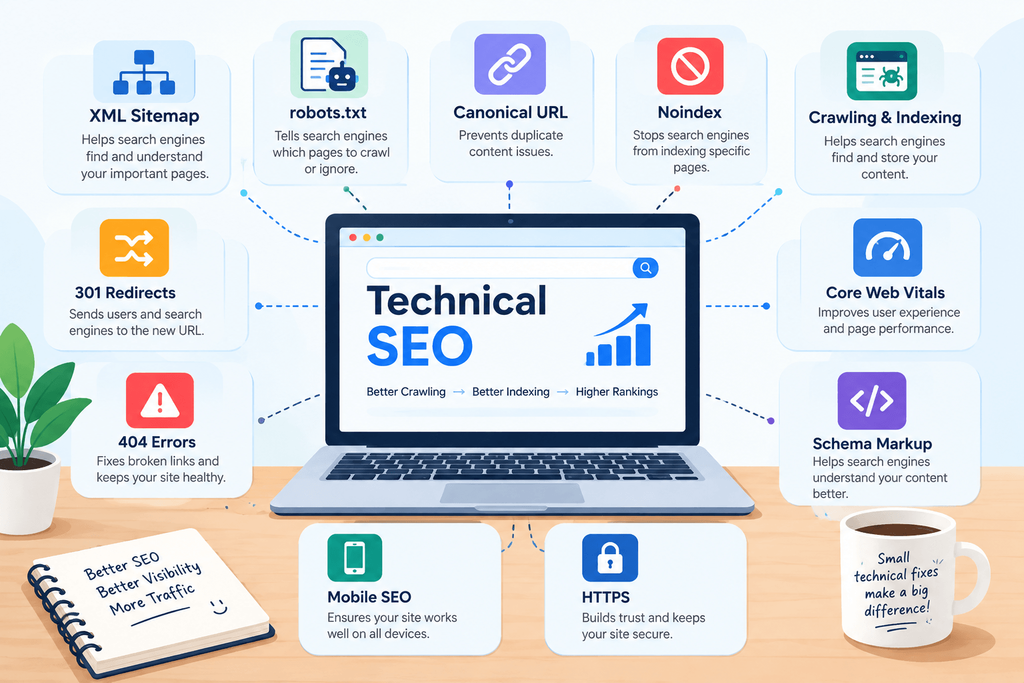
Technical SEO is the process of improving the technical parts of your website so search engines like Google can find, understand, and rank your pages easily.
Think of it this way: your website is like a house. Content is the furniture and decoration inside. Technical SEO is the foundation, the doors, and the wiring. If the foundation is weak, it doesn’t matter how nice the furniture looks — the house still has problems.
Technical SEO does not deal with the words on your page or the links pointing to your site. Instead, it focuses on things like:
- How fast your pages load
- Whether your site works well on mobile phones
- Whether search engine bots can crawl your pages without getting stuck
- Whether your site has a clean, secure structure
When these things are working well, Google trusts your website more. And when Google trusts your site, it becomes easier for your pages to show up in search results.
In short, technical SEO is not about writing better content — it’s about making sure the content you already have gets a fair chance to be seen.
Why Is Technical SEO Important?
You could have the best-written blog post in your niche, but if search engines cannot crawl or load your page properly, that content may never reach your audience.
Here’s why technical SEO matters so much:
Search engines send out small programs called “crawlers” to scan your website. If your site has broken links, slow loading speed, or confusing navigation, these crawlers may skip important pages or leave before finishing the job.
Users also judge your site instantly. If a page takes more than a few seconds to load, most visitors simply leave. This is called a high bounce rate, and it tells Google your site may not offer a good experience.
Technical SEO also affects trust and security. Sites without HTTPS, for example, are often flagged as unsafe, which pushes visitors away before they even read a single word.
Simply put, technical SEO is the base that everything else — content, keywords, and backlinks — depends on.
How Technical SEO Works
Technical SEO works by making it easier for search engines to complete three basic steps: crawling, indexing, and ranking.
Crawling is when search engine bots visit your website and scan its pages. If your site structure is messy or blocked in some way, bots may not find all your content.
Indexing happens after crawling. Once Google understands what a page is about, it stores that page in its huge database, called an index. If a page isn’t indexed, it simply cannot appear in search results — no matter how good it is.
Ranking is the final step, where Google decides where your page should appear compared to others, based on relevance, quality, and technical performance.
Technical SEO supports all three steps. A well-optimized site allows bots to crawl freely, get indexed correctly, and compete fairly in rankings. Without this foundation, even great content can stay invisible.
Important Technical SEO Factors
Let’s go through the technical elements that actually make a difference. You don’t need to master all of them overnight, but understanding each one will help you prioritize what to fix first.
1. Website Speed
Page speed is one of the biggest ranking factors today. A slow website frustrates users and gets penalized by search engines. Large images, unnecessary code, and poor hosting are the most common causes of slow loading times. Compressing images and using a reliable hosting provider can make a big difference.
2. Mobile-Friendliness
More than half of all web traffic now comes from mobile devices. Google uses “mobile-first indexing,” which means it looks at your mobile version of the site first, not the desktop version. If your site looks broken or hard to use on a phone, your rankings will likely suffer.
3. Crawlability
Crawlability means how easily search engine bots can move through your website. If your internal links are messy or some pages are accidentally blocked, bots may miss important content. A clean site structure with clear navigation helps bots — and users — find what they need.
4. XML Sitemap
An XML sitemap is like a map of your website that you hand directly to search engines. It lists all your important pages so bots know exactly what to crawl and index. Without a sitemap, some pages might get overlooked, especially on larger websites.
5. Robots.txt File
This is a simple text file that tells search engines which pages they can or cannot crawl. It’s useful for blocking pages you don’t want indexed, like admin pages or duplicate content. But a small mistake in this file can accidentally block your entire site from search engines, so it needs to be set up carefully.
6. HTTPS and Website Security
HTTPS encrypts the data shared between your website and its visitors, keeping information safe. Google has confirmed that HTTPS is a ranking signal, and browsers now warn users when they visit sites without it. If your site still uses HTTP, switching to HTTPS should be a priority.
7. Structured Data (Schema Markup)
Structured data is extra code added to your pages that helps search engines understand your content better. It can also create rich results in search, like star ratings, FAQs, or recipe details showing directly on the search page. This can improve your click-through rate significantly.
8. Canonical Tags
When you have similar or duplicate pages, canonical tags tell search engines which version is the “original” one to rank. Without them, search engines may get confused about which page to show, splitting your ranking power between duplicates instead of boosting one strong page.
9. Broken Links and 404 Errors
Broken links create dead ends for both users and search bots. Too many 404 errors can hurt user experience and waste your crawl budget — the limited number of pages Google is willing to crawl on your site during each visit. Regularly checking and fixing broken links keeps your site healthy.
10. URL Structure
Clean, readable URLs are easier for both users and search engines to understand. A URL like yoursite.com/technical-seo-guide is far better than something like yoursite.com/p=1234&ref=xyz. Simple URLs also tend to get shared and clicked more often.
11. Core Web Vitals
Core Web Vitals are a set of specific measurements Google uses to judge user experience — including how fast the main content loads, how quickly the page becomes interactive, and how stable the layout is while loading. These metrics directly affect your rankings, so keeping them in a healthy range matters.
12. Duplicate Content
When the same or very similar content appears on multiple pages, search engines may struggle to decide which one to rank. This can dilute your SEO efforts. Using canonical tags or simply avoiding repeated content helps solve this issue.
Technical SEO Checklist
Use this simple checklist to review your website step by step:
- Check your website loading speed on both mobile and desktop
- Make sure your site is fully responsive on mobile devices
- Confirm your site uses HTTPS, not HTTP
- Create and submit an XML sitemap to Google Search Console
- Review your robots.txt file for accidental blocks
- Fix all broken links and correct 404 errors
- Add canonical tags to duplicate or similar pages
- Use clean, descriptive URLs for every page
- Add structured data where relevant, like FAQs or reviews
- Check your Core Web Vitals in Google Search Console
- Remove or merge duplicate content across your site
- Make sure important pages are not accidentally blocked from indexing
Go through this list slowly. You don’t have to fix everything in one day — even solving two or three issues can lead to noticeable improvement over time.
Tools to Check Technical SEO
You don’t need expensive software to start. Here are some reliable, beginner-friendly tools:
Google Search Console – This free tool from Google shows crawling errors, indexing issues, mobile usability problems, and Core Web Vitals data directly from Google itself.
Google PageSpeed Insights – This tool tests your page loading speed and gives specific suggestions to improve it, for both mobile and desktop versions.
Screaming Frog SEO Spider – This tool crawls your website just like a search engine would, helping you find broken links, duplicate content, and missing tags.
Ahrefs Site Audit – A paid tool that gives a detailed technical health report, including crawlability, speed, and structural issues across your entire site.
GTmetrix – Another useful speed-testing tool that breaks down exactly what is slowing your website down, with clear, easy-to-follow suggestions.
Start with Google Search Console since it’s free and gives you direct insight from Google. Once you’re comfortable, you can explore the other tools for deeper analysis.
Common Technical SEO Mistakes
Even experienced website owners make these mistakes. Watch out for them:
Ignoring mobile experience. Many site owners focus only on how their site looks on a computer and forget to test it on a phone, where most visitors actually browse.
Blocking important pages in robots.txt. A small typo in this file can accidentally hide your entire website from search engines without you even realizing it.
Not fixing broken links. Over time, links break as pages get moved or deleted. Ignoring them creates a poor experience for both users and search bots.
Skipping HTTPS. Some websites still run on HTTP, which not only hurts rankings but also makes visitors distrust the site.
Having multiple versions of the same URL. Pages accessible through both www and non-www, or http and https, without proper redirects can confuse search engines and split ranking signals.
Overlooking page speed. Many people invest in content but never check how long their pages actually take to load, losing visitors before they even see the content.
Forgetting the XML sitemap. Without submitting a sitemap, some pages — especially newer ones — may take much longer to get indexed.
Avoiding these common mistakes alone can put your website ahead of many competitors who never bother checking their technical setup.
Technical vs On-Page vs Off-Page SEO
It’s easy to confuse these three types of SEO, so here’s a simple breakdown:
Technical SEO focuses on the backend of your website — speed, crawlability, mobile-friendliness, and security. It makes sure search engines can access and understand your site properly.
On-Page SEO deals with the content itself — things like keyword usage, headings, meta descriptions, and internal linking within your written content. It’s about making each individual page valuable and relevant.
Off-Page SEO involves actions taken outside your website, mainly building backlinks from other trusted sites, along with social signals and brand mentions. It shows search engines that other websites vouch for your credibility.
All three work together. Technical SEO builds the foundation, on-page SEO fills it with quality content, and off-page SEO builds your reputation across the web. Skipping any one of them limits how far your website can grow.
FAQs
1. Is technical SEO hard to learn for beginners?
Not really. Many concepts sound technical at first, but most fixes — like compressing images or submitting a sitemap — are simple once you understand what they do and why they matter.
2. How often should I check my technical SEO?
A good practice is to review it every one to three months, or immediately after making major changes to your website, like a redesign or migration.
3. Can I do technical SEO without coding knowledge?
Yes. Many issues can be fixed using plugins, website builders, or free tools like Google Search Console, without touching any code directly.
4. Does technical SEO guarantee higher rankings?
Not by itself. It removes the barriers that stop your content from ranking well, but you still need good content and quality backlinks to rank higher.
5. What is the most important technical SEO factor to fix first?
Page speed and mobile-friendliness usually have the biggest, most immediate impact, since they directly affect both user experience and search rankings.
6. How long does it take to see results from technical SEO fixes?
It varies, but many site owners notice improvements in crawling and indexing within a few weeks, while ranking changes can take a bit longer to show up.
7. Do small websites need technical SEO too?
Yes. Even small or new websites benefit greatly, since a clean technical setup helps search engines discover and trust your site much faster.
Technical SEO might sound intimidating at first, but it really comes down to a few core ideas: make your site fast, easy to crawl, secure, and mobile-friendly. Start with the checklist above, fix one issue at a time, and you’ll likely notice steady improvement in how search engines treat your website.
Pingback: What Is an XML Sitemap? A Beginner's Guide | MaheshTalkies